Getting a Grip on GRC — Part 1 of 5
What are we actually trying to protect?
A five-part practical series for smaller organizations and the consultants who serve them. Written from twenty years on the inside of IT operations, security, risk and compliance.
The challenge: starting in the wrong place
Most smaller companies that begin a serious risk and compliance effort start in the wrong place. They buy a tool. Or they download an ISO 27001 control list. Or they write a policy. Or they hire someone to "do the GRC project."
None of those things are wrong, but they share a problem: they all assume you already know what you are trying to protect. In my experience, you usually don't. Not in the structured way GRC needs.
I have seen smart, well-resourced companies discover, three months into their compliance program, that nobody could produce a clean list of their critical applications. I have seen consultants tasked with a risk assessment without first being told which assets, data and processes were actually in scope. I have seen auditors find gaps that turned out to be nothing more than "we forgot this system existed."
Risk and compliance management without a clear inventory is guesswork dressed up in a spreadsheet. Before you talk about risks, threats, controls or frameworks, you have to answer one disarmingly simple question: what are we trying to protect?
This is step one. And for smaller organizations especially, it is the most important step of the entire program.
Why the inventory matters more than people think
Every risk you identify later is a risk to something. Every control you put in place protects something. Every audit finding ties back to something you should have known about. That "something" is the inventory.
Without a serious inventory you will:
- miss critical assets entirely (the classic forgotten file server, the CRM owned by sales, the third-party tool nobody put on the list)
- over-protect trivial things and under-protect the crown jewels
- waste budget on controls that don't map to any asset
- fail every external audit on the first question
Conversely, a decent inventory unlocks everything that comes after. Risks suddenly have an object. Controls have a target. Compliance scope becomes negotiable based on facts. Reports stop being abstract.
This is true at large enterprises too — but they have armies of CMDB engineers, asset managers and process owners. Smaller organizations don't. Which is exactly why a pragmatic, fit-for-purpose inventory is non-negotiable for them.
How to do it without it becoming a project from hell
Here is the practical part. Drawing on what actually works for SMBs and individual risk officers, this is the order I recommend.
1. Pick the right level of detail. You are not building a CMDB. You are building a working inventory. Aim for 80% coverage in a week, not 100% in a year. Perfection is the enemy here.
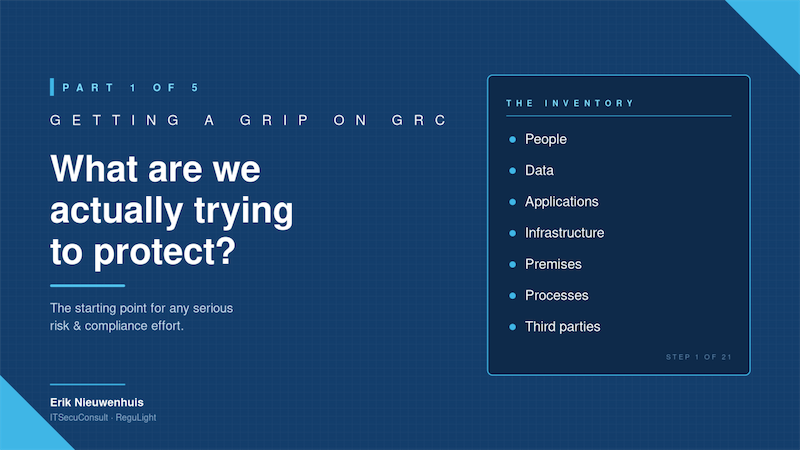
2. Cover all the categories, not just IT. A good baseline:
People: employees, contractors, key roles
Data: customer data, financial data, intellectual property, personal data under GDPR scope
Applications: critical business apps, supporting tools, SaaS subscriptions
Infrastructure: networks, servers (cloud and on-prem), endpoints
Premises: offices, server rooms, locks and physical access
Processes: core business processes, support processes, financial processes
Third parties: suppliers, service providers, outsourcing, integrations
Most "IT inventories" stop at applications and infrastructure. That is a mistake. Data, processes and third parties are where the real risk and the real compliance scope tend to live.
3. Talk to the people who run the place. IT operations, finance, HR, sales operations. They know what is in use, what is dependent on what, and what would actually break the company if it stopped working. The inventory you build at your desk from documentation will always be wrong. The one you build by walking around — physically or in Teams — will be much closer to reality.
4. Mark what is critical. Not every asset is equal. A lightweight categorization — for example critical / important / supporting — is enough at this stage. You will use this later when you assess impact.
5. Capture ownership. For every asset of any importance, name a human being. "IT" is not an owner. "The CFO" is.
6. Stop, even when it feels incomplete. It will feel incomplete. That is fine. Inventories are living things. The point of step one is to get something on paper that you can build on. You will refine it continuously as you move into the next steps.
Where ReguLight fits
A short note on what ReguLight does and does not do at this stage. ReguLight is deliberately not an asset management or CMDB tool. It does not maintain a register of servers, applications, devices or data stores. The asset inventory itself is something you build and keep wherever it makes sense for you — a spreadsheet, a document, an existing IT tool, the company's network diagram. That is by design: a small organization does not need yet another place to maintain its asset list.
What ReguLight gives you, from the moment you first open the app, is the structure that uses that inventory in everything that comes next. Personnel, documents, internal controls, risks, issues, tasks and incidents each have their own dedicated module in the app, with their own properties, and links between them. You don't have to design that data model — it is already there, derived from how GRC works inside larger, regulated organizations, but stripped of the complexity that makes those tools unusable for a small team.
The built-in demo scenarios let you see what a populated GRC system looks like before you record a single entry of your own. The Setup Wizard walks you through the first steps. And because everything stays local on your Mac, you can start capturing sensitive information from day one without first negotiating a cloud DPA.
So the practical sequence at this stage is simple: keep your asset inventory wherever it lives today, and use ReguLight to build the GRC layer on top of it. You do not have to commit to a multi-year program to get value. By the end of an afternoon you have a foundation that the rest of your GRC program will rest on for years.
Up next
Once you know what you are protecting, the next question is: what could go wrong? In Part 2 we go from the inventory into threats, scenarios and the early shape of risk.
Erik Nieuwenhuis is the founder of ITSecuConsult and the developer of ReguLight, a lightweight GRC app for macOS, available on the Mac App Store.